






FieldInsight Feature Release — Week 26 2026
Feature update for FieldInsight — what’s new in Week 26 2026. Here’s everything shipped to the platform this week (up until 28 June 2026).
Drag-and-Drop Line Item Sorting
What’s new
- Reorder line items within invoices, quotes, and job pages by dragging and dropping
- Move line items between different sections on documents
- Works consistently across both documents and job pages
Why it helps
You can now quickly reorganize your quotes and invoices without deleting and re-adding items. This saves time when you need to present line items in a specific order for your customers.
Project Claim Budget Limits
What’s new
- System now prevents claims from exceeding the project budget percentage
- Clear error messages display when budget limits are exceeded
- Validation applies when creating new claims or unlocking existing ones
Why it helps
You’ll avoid accidentally over-claiming on projects, keeping your billing accurate and preventing disputes with clients exceed budgets.
Decommissioned Asset Visual Indicators
What’s new
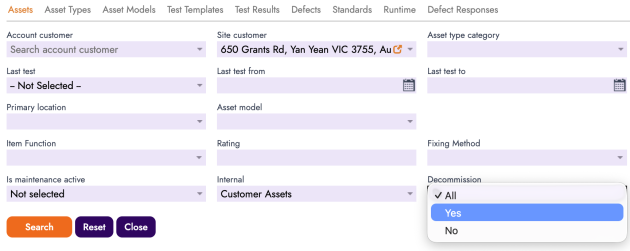
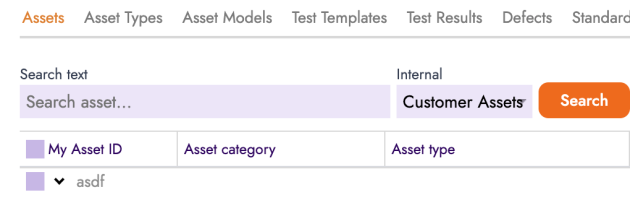
- Decommissioned assets are now highlighted in light grey in the asset list
- A recognition bar clearly identifies decommissioned assets
Why it helps
Your team can instantly see which assets are no longer in service, reducing confusion and preventing work from being scheduled against retired equipment.
Purchase Order Approval Validation
What’s new
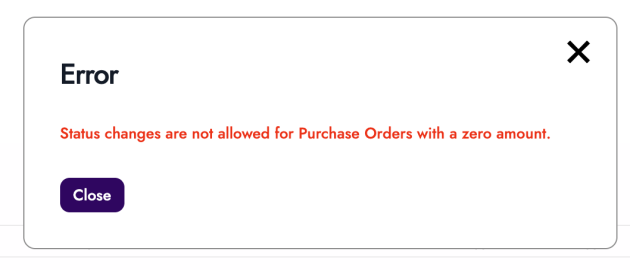
- Purchase orders cannot be submitted when the amount is zero or has no line items
- Users are notified when a purchase order exceeds their approval limit
- Applies to both desktop and mobile views
Why it helps
Empty or incomplete purchase orders can no longer slip through your approval process, ensuring every PO that moves forward is ready for action.
Locked Project Assignment After PO Approval
What’s new
- Project assignment is locked once a purchase order is approved
- Reverting to draft status does not unlock project assignment changes
Why it helps
This protects your project cost tracking by ensuring approved purchase orders stay linked to the correct project, preventing accidental changes that could throw off your job costing.
Email Button Always Visible on Documents
What’s new
- The email button now displays on invoices / Documents regardless of invoice status

Why it helps
You can always quickly email a document/invoice to your customer without hunting for the option, speeding up your workflow.
Timesheet Advanced Search Filters
What’s new
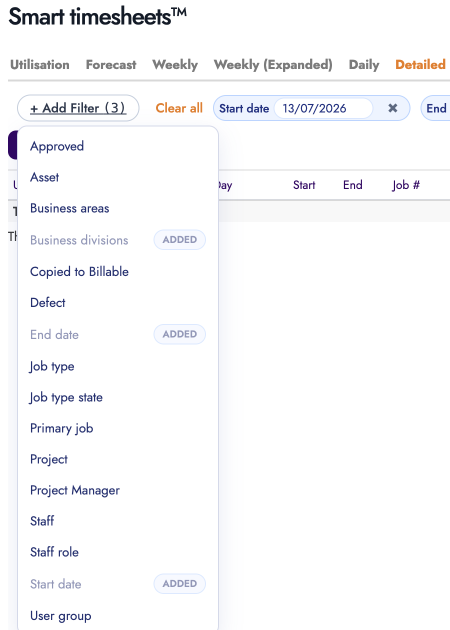
- New filter options added to timesheet detailed search
- Filter by asset and other criteria using the improved Add Filter function
 j
j
Why it helps
Finding specific timesheet entries is now faster, especially when you need to review hours logged against particular assets or jobs.
Export Bill Attachments to Xero
What’s new
- New option to include file attachments when exporting bills to Xero
- Bill report and attachments are sent together in a single export
In the Xero Integration settings, enable File Attachments

Why it helps
Your supporting documents like supplier invoices now flow directly into Xero with the bill, keeping your accounting records complete without manual uploads.
Asset Advanced Search Filters
What’s new
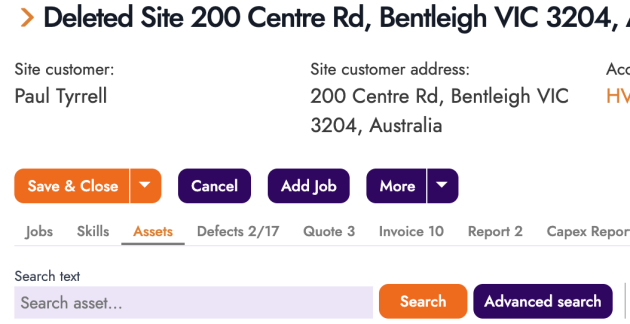
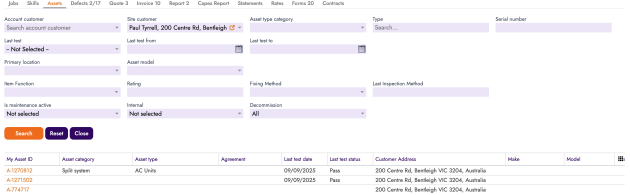
- Reworked filter system for asset searches
- Add multiple filter criteria to find assets more precisely
Click on Advanced Search for a Site, use any of the Filters
Why it helps
Locating specific assets in large inventories is now quicker, helping technicians and office staff find exactly what they need without scrolling through long lists.
Mandatory Cost Codes for Projects
What’s new
- Cost codes can now be marked as mandatory for projects
- Project Builder enforces required cost codes before saving
Enable for each cost code whether it is mandatory.
https://app.fieldinsight.com/scheduler/inventory/#app=cost-codes

Why it helps
Ensure your team always assigns the right cost codes to projects, giving you accurate job costing data and eliminating missing information in your reports.
Colour-Coded Defect Status
What’s new
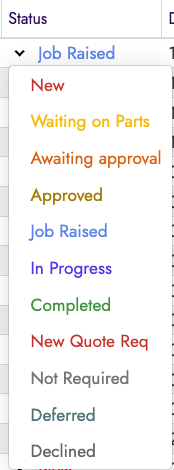
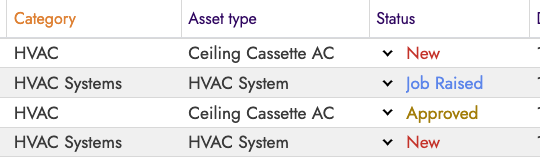
- Defect list now displays status with background colours
- Visual indicators match the configured status colours
Why it helps
Spot open, in-progress, or resolved defects at a glance, making it easier to prioritize which issues need immediate attention.
Purchase Order Column on Bills
What’s new
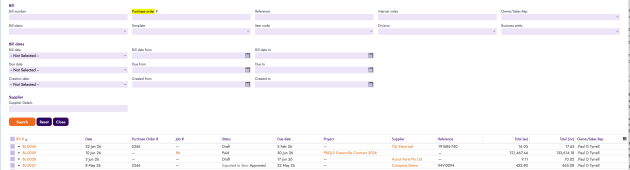
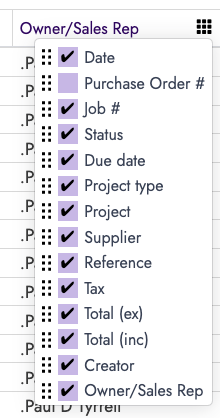
- Purchase order number column added to bill views
- Purchase order filter added to bill advanced search
Why it helps
Matching bills to their original purchase orders is now straightforward, simplifying your accounts payable reconciliation process.
Project Manager Bill Approval
What’s new
- Project-related bills can only be approved by the assigned project manager with sufficient approval limits
- Non-project bills continue using existing approval workflows
- Applies to approvals from both the bill page and bill list
Why it helps
Project managers maintain control over their project costs, ensuring bills are reviewed by the person who understands the job before money goes out the door.
What You Should Do Now
- Book a Demo. You’ll be in touch with an automation expert who has worked in this space for over 5 years, and knows the optimal workflow to address your needs.
- If you’d like access to free articles about managing HVAC workflows, go to our blog.
- If you know someone who’d enjoy reading this page, share it with them via email, Linkedin, Twitter, or Facebook.
What You Should Do Now
- Book a Demo. You’ll be in touch with an automation expert who has worked in this space for over 5 years, and knows the optimal workflow to address your needs.
- If you’d like access to free articles about managing HVAC workflows, go to our blog.
- If you know someone who’d enjoy reading this page, share it with them via email, Linkedin, Twitter, or Facebook.