






FieldInsight Update: Project Filters, PDF Images & More
FieldInsight’s field service management software gets better every week. Here’s what the team shipped — real, ready-to-use features for HVAC, plumbing, electrical, fire protection, and maintenance businesses.
Re-vamp of the Advanced Search Feature on Various pages
To optimise the realestate and allow Filters to be saved (Similar to the Follow-up report) for quick access, removing the need to have to re-enter search criteria each time.
Select the filters for the Search, can select more than one, will be prompted to make additional selections based on field selected (ie a Site if its a filter for a specific site), or date range.
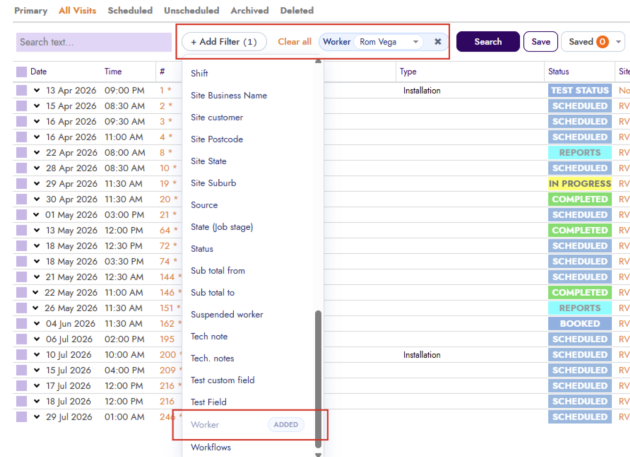
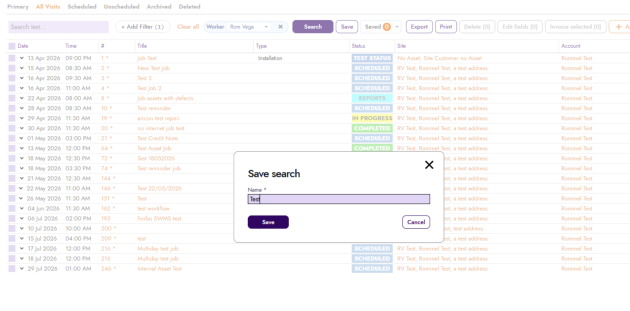
Once selected made, click to Save the search, give it a name that makes sense for what the filter includes; ie Job Type, Last month, Job Status
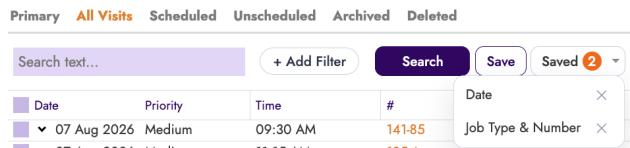
You can then access the saved search and track how many searches are Pre-Saved
Activity Type Column & Filter on Detailed Timesheets
What’s new
- Added an Activity Type column to the detailed timesheet view
- Added an Activity Type filter so you can narrow detailed timesheets by specific activity types

Why it helps
Office managers and payroll staff can now quickly sort and filter timesheet entries by activity type, making it faster to review labour hours and process pay runs accurately.
Priority Column on Job List
What’s new
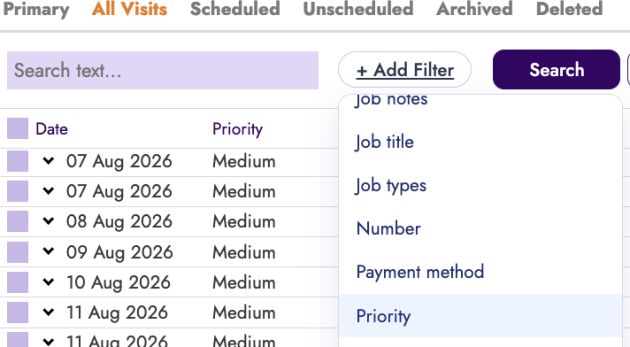
- A Priority column is now visible on the job list view, click on the 9 dots on the header row, select to activate the column visibility flag

Why it helps
Schedulers and office managers can see job priority at a glance without opening each job, helping teams focus on urgent work first. It has also been added to the Job Filter selection criteria.
Job Type Column in Job Custom Fields
What’s new
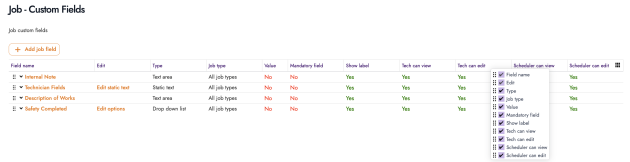
- Added a Job Type column to the job custom fields view
Why it helps
You can now see which job type each custom field relates to directly in the list, saving time when managing custom field configurations across different job types. Especially handy if you have more than 20 Job custom fields across different Job Types.
Filter Picker for Project List
What’s new
- The project list now includes a filter picker with the ability to add filters such as account/customer
- You can save filter combinations and quickly switch between saved filters

Why it helps
Project managers can now filter their project list by customer and other criteria, and save those views for quick access — making it much easier to manage large numbers of projects.
Change Claim Type on Projects
What’s new
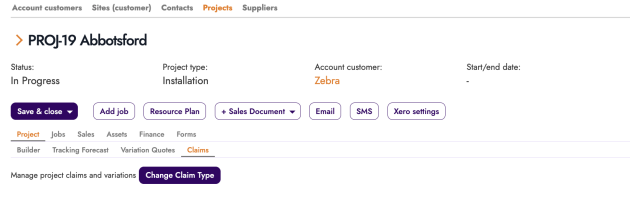
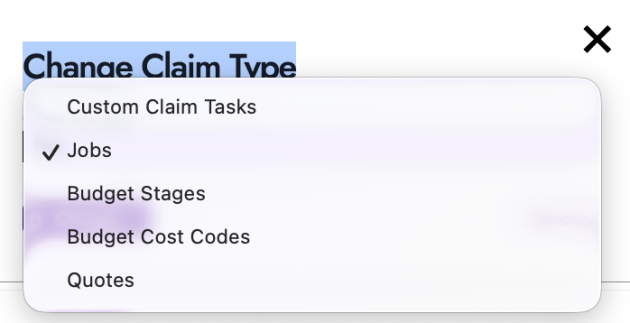
- A new button allows you to change the claim type on a project, provided no claims have been created yet

Why it helps
If a project’s claim type was set incorrectly during setup, you can now fix it without recreating the project — saving time and avoiding data duplication.
Quote & Work Order PDF Line Item Images
What’s new
- A new system setting allows product images to be displayed under each section in quote and work order PDFs
- A PDF Image column lets you control which line items include images
- Enabled via a template setting: “Show item images under sections”
Why it helps
Trade businesses quoting equipment or materials can now include product images directly in their PDF documents, giving customers a clearer picture of what’s being proposed and helping close jobs faster.
Miscellaneous Improvements
What’s new
- When jobs are created from maintenance contracts, the manager is now automatically copied across to the new job
- This ensures the right manager is always linked to contract-generated jobs without manual data entry, keeping accountability clear and reducing admin overhead.
- Site export to CSV has been optimised so it no longer fails when exporting a large number of sites
- Businesses with thousands of sites can now reliably export their full site list to CSV for reporting, auditing, or importing into other systems.
- On the sites and assets tab, inactive assets are now visually marked in grey
- It’s now immediately obvious which assets are inactive, so your team won’t accidentally schedule work against decommissioned or retired equipment.
- Increased the contrast on field borders and backgrounds across the application for improved readability
- Form fields and input areas are now easier to see, especially on lower-quality screens or in bright environments — a small change that makes daily use more comfortable.
What You Should Do Now
- New to FieldInsight : Book a Discovery Call. You’ll be in touch with an automation expert who has worked in this space for over 10 years.
- If you’d like access to free articles about managing HVAC workflows, go to our blog.
- If you know someone who’d enjoy reading this page, share it with them via email, LinkedIn or Facebook.
What You Should Do Now
- Book a Demo. You’ll be in touch with an automation expert who has worked in this space for over 5 years, and knows the optimal workflow to address your needs.
- If you’d like access to free articles about managing HVAC workflows, go to our blog.
- If you know someone who’d enjoy reading this page, share it with them via email, Linkedin, Twitter, or Facebook.