






FieldInsight Update: GPS Speed, Drag-and-Drop & More
FieldInsight’s field service management software gets better every week. Here’s what the team shipped in Week 29 of 2026 (released 13 July 2026) — real, ready-to-use features for HVAC, plumbing, electrical, fire protection, and maintenance businesses.
Drag-and-Drop for Line Packages
What’s new
- You can now reorder line packages using drag-and-drop when building quotes and jobs
Why it helps
Arranging your line items and packages is now faster and more intuitive — just drag them into the order you want instead of manually editing sequences.
Speed Info in GPS Tracker Panels
What’s new
- GPS tracker information boxes now display vehicle speed data
Why it helps
Office managers and fleet supervisors can see at a glance how fast vehicles are travelling, making it easier to monitor driver behaviour and improve safety compliance.
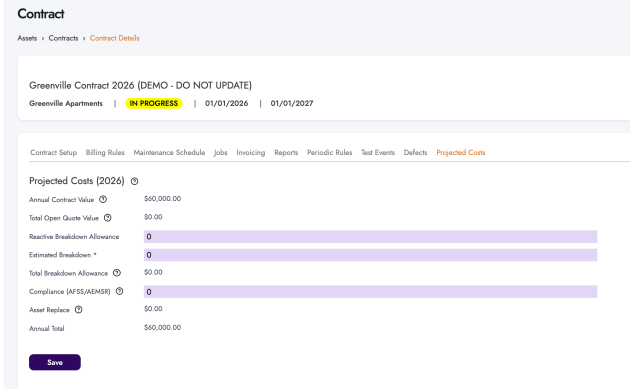
Projected Costs (PPM contracts) Now on a Separate Contract Tab
What’s new
- Projected cost information on contracts has been moved to its own dedicated tab
- The tab is now always visible, regardless of the annual billing rule type selected
Why it helps
You can review projected costs on any contract without needing a specific billing rule, giving you clearer financial visibility across all your service agreements.
Unapproved vs Approved Hours on Cost Tracking (projects)
What’s new
- The hours column in cost tracking now separates unapproved and approved hours
- A new link lets you quickly view unapproved hours with clear labelling

Why it helps
Project managers can instantly see which hours still need approval, making it easier to stay on top of timesheets and keep project costing accurate.
New Status Filter and Column for To-Dos
What’s new
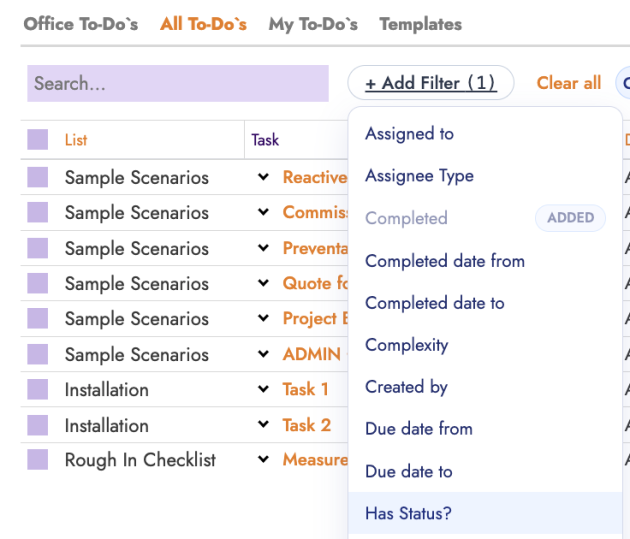
- A new “Has Status” filter has been added to the to-do list
- A date picker filter is now available for safer filtering
- A new status column shows Yes/No/All options at a glance
Why it helps
Finding and sorting your to-dos by status is now quicker, so nothing slips through the cracks in your daily workflow.
Preserved Line Breaks in Timesheet Notes
What’s new
- Line breaks and formatting in timesheet notes are now preserved when viewing reports
Why it helps
Notes entered by your field team display exactly as they were typed, making timesheet reports easier to read and more professional.
Service Code Made Mandatory on Mobile and Scheduler
What’s new
- A new setting lets you make the service code field required on batches, mobile, and the scheduler
- Visibility and required settings are configurable under system fields


Why it helps
Enforcing service codes at data entry ensures your reporting and job costing stay consistent, whether your team is in the office or out in the field.
Status Change Buttons on More Document Pages
What’s new
- Approve, submit for approval, and review buttons are now visible on purchase orders, supplier credits, invoices, and quotes at the appropriate statuses
- The finalise button on purchase orders now appears for partial receipt and full receipt statuses
Why it helps
You can move documents through your approval workflow directly from the page you’re already on, cutting out unnecessary navigation and speeding up your admin process.
Bulk Fail on Asset Tests Now Prompts for Defect Entry
What’s new
- When using the bulk “Fail All” action on asset tests, the system now prompts you to record a defect
Why it helps
Defects are captured consistently during bulk testing, ensuring your compliance records are complete and audit-ready — especially important for fire protection and maintenance teams.
Mandatory Cost Codes for Projects
What’s new
- Individual cost codes can now be flagged as “Mandatory for Projects” from the cost codes list under Inventory
- Flagged cost codes must be assigned before a project can be saved

Why it helps
Ensures every project has the right cost codes from the start, preventing incomplete data and keeping your project budgets and reporting accurate.
What You Should Do Now
- New to FieldInsight : Book a Discovery Call. You’ll be in touch with an automation expert who has worked in this space for over 10 years.
- If you’d like access to free articles about managing HVAC workflows, go to our blog.
- If you know someone who’d enjoy reading this page, share it with them via email, LinkedIn or Facebook.
What You Should Do Now
- Book a Demo. You’ll be in touch with an automation expert who has worked in this space for over 5 years, and knows the optimal workflow to address your needs.
- If you’d like access to free articles about managing HVAC workflows, go to our blog.
- If you know someone who’d enjoy reading this page, share it with them via email, Linkedin, Twitter, or Facebook.