






FieldInsight Feature Release — Week 27 2026
Feature update for FieldInsight — what’s new in Week 27 2026. Here’s everything shipped to the platform this week (until 3rd July 2026).
Vehicle Speed in GPS Tracker
What’s new
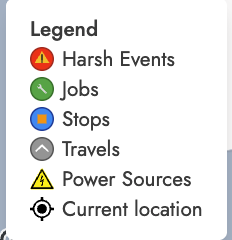
- Speed information is now displayed in GPS tracker vehicle details
Why it helps
Get better visibility into how your fleet is operating in the field, helping you monitor driver behaviour and improve safety compliance.
Job Type Carries Over from Quote to Job
What’s new
- When creating a job from a quote, the job type now automatically copies across
Why it helps
Saves time and reduces errors by eliminating the need to manually re-enter job type information when converting quotes to jobs.
PPM Projected Costs Tab on Contracts
What’s new
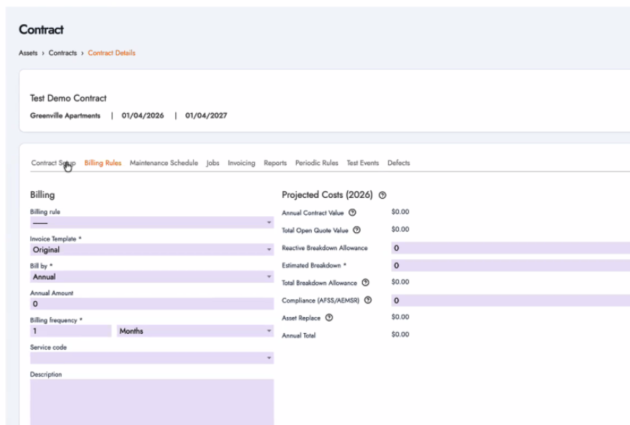
Move projected costs into a separate tab after Defects so the projected cost setup is independent of billing rule type.
- Projected costs now appear in a dedicated tab on contract billing
- This information is now always visible regardless of billing rule type
Why it helps
Easily review projected costs on any contract without having to switch billing settings, giving you clearer financial visibility on your service agreements.
Frequently Asked Questions:
How can I see vehicle speed in the GPS tracker?
Speed information is now displayed directly in the GPS tracker vehicle details.
This gives you better visibility into how your fleet is operating in the field. You can more easily monitor driver behaviour and support safety compliance across your vehicles.
Does the job type carry over when I create a job from a quote?
Yes. When you create a job from a quote, the job type now automatically copies across.
This small but useful improvement saves time and reduces the chance of manual entry errors, so your jobs are set up correctly from the start without extra steps.
Where do I find projected costs on contracts now?
Projected costs have moved into their own dedicated tab (after Defects) on contract billing.
This information is now always visible, regardless of the billing rule type selected. You no longer need to switch settings just to review projected costs, giving you clearer and more consistent financial visibility on your service agreements.
What You Should Do Now
- Book a Demo. You’ll be in touch with an automation expert who has worked in this space for over 5 years, and knows the optimal workflow to address your needs.
- If you’d like access to free articles about managing HVAC workflows, go to our blog.
- If you know someone who’d enjoy reading this page, share it with them via email, Linkedin, Twitter, or Facebook.