






FieldInsight Feature Release — Week 20 2026
Feature update for FieldInsight — what’s new in Week 20 2026.
Here’s everything shipped to the platform this week.
AI enabled OCR Import for Bills or PO’s
What’s new
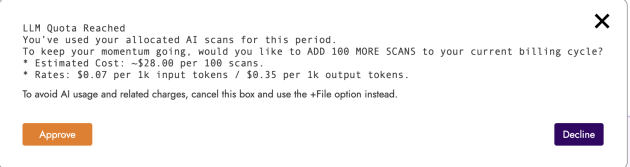
- AI powered OCR document import is now enabled for all accounts by default – this is for Bill or PO loading into FieldInsight. This feature will scan the document line items and meta data and create the items and pricing from the scan.
- Drag and Drop is now used to invoke the AI scanning tool, note Usage charges now apply to AI scans. This symbol indicates AI usage charges


- If you do not wish to incur the usage charged, please use the +File to select the document to import and it will add it as an attachment to the Bill where you will need to manually add the items
- File managers have been moved to the bottom of document pages for a cleaner layout
- File names are now shown in import details for easier reference
Why it helps
You can now automatically extract data from uploaded documents without needing to request this feature to be turned on, saving time on manual data entry for bills and invoices. This process allows Bill importing to be optimised in FieldInsight to reduce double data entry in accounting, once the Bill is Imported you can sync to Accounting (Xero, MYOB ARL) for payment/reconciliation.
Restore Decommissioned Assets
What’s new
- Added a restore option for decommissioned assets, matching the existing restore function for deleted assets
Why it helps
If equipment was decommissioned by mistake or brought back into service, you can now restore it without re-entering all the asset details from scratch.
Project Claims Grouped by Stage
What’s new
- Cost cards in claims are now grouped by project stage
- Invoice spreadsheets create separate sections for each stage with cost columns grouped accordingly
Why it helps
For multi-stage projects, you can now see costs organised by stage when creating claims, making it easier to track and bill for work completed at each phase of the project.
Custom Date Fields in Search Forms
What’s new
- Date-type custom fields now display with a clear date range format showing start date and end date
Why it helps
When searching records using custom date fields, you can now easily filter by date ranges, making it faster to find jobs, assets, or other records within specific time periods.
Asset ID in Job Export
What’s new
- Job CSV exports now include a column for the first asset ID linked to each job
Why it helps
When exporting job data for reporting or analysis, you can now see which asset each job relates to without having to look it up separately.
Quote and Variation Status in Claims
What’s new
- Quote and variation status is now visible in the project claims cost card list
Why it helps
When preparing claims, you can quickly see whether quotes and variations have been approved, helping you avoid billing for work that hasn’t been signed off yet.
Service Item Column in Pay Items
What’s new
- Added a service item column to the pay items list in Job Manager settings
Why it helps
You can now see at a glance which service item each pay item is linked to, making it easier to manage your pricing and payroll configuration.
Leave Hours Tracking Improvements
What’s new
- Leave time (except unpaid leave) now records to a dedicated leave hours column in timesheets
- Unpaid leave records to the lunch and break hours column
- Regular work time records to normal hours
Why it helps
Your timesheet reports now correctly separate leave time from regular work hours, giving you accurate data for payroll processing and leave balance tracking.
Supplier Contacts
What’s new
- Added a contacts page to supplier records where you can store multiple contact people
Why it helps
You can now keep track of different contacts at each supplier—such as sales reps, accounts staff, or technical support—so your team always knows who to call.
Colour-Coded Document Status
What’s new
- Sales document statuses (invoices, quotes, etc.) now display with colour coding—grey for draft, yellow for submitted, and other colours for different states


Why it helps
You can instantly see the status of invoices and quotes at a glance without reading each label, helping you quickly identify which documents need attention.
Simplified API Authentication
What’s new
- You can now generate a personal API key directly from integration settings
- No developer account required for single-business integrations
Why it helps
If you’re connecting FieldInsight to other software or building a custom integration for your business, setup is now simpler—just generate a key and start connecting without extra account registration.
What You Should Do Now
- Book a Demo. You’ll be in touch with an automation expert who has worked in this space for over 5 years, and knows the optimal workflow to address your needs.
- If you’d like access to free articles about managing HVAC workflows, go to our blog.
- If you know someone who’d enjoy reading this page, share it with them via email, Linkedin, Twitter, or Facebook.