






FieldInsight Feature Release — Week 19 2026
Feature update for FieldInsight — what’s new in Week 19 2026. Here’s everything shipped to the platform this week.
Bulk Reschedule Jobs
What’s new
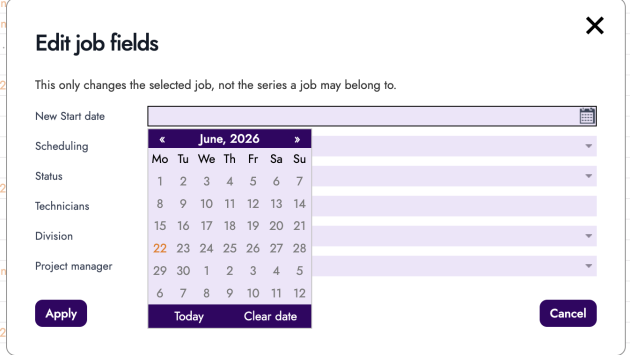
- You can now reschedule multiple jobs at once by selecting them and choosing a new date from the edit fields option
Why it helps
When plans change, you no longer need to update jobs one by one. Select the jobs you need to move and reschedule them all in a single action, saving time when responding to weather delays, staff changes, or customer requests.
Safety Data Sheets for Inventory Items
What’s new
- Attach files such as safety data sheets directly to inventory items in the back office
- Technicians can view these attachments in the mobile app when adding products to a job
Why it helps
Your field team can instantly access safety information for chemicals, cleaning fluids, and other materials right from their phone, helping them stay compliant and work safely without calling the office.
Asset Decommissioning
What’s new
- A new “Decommission” button lets you mark assets as no longer in service without deleting them
- Decommissioned assets are filtered separately from active and deleted assets
Why it helps
When you stop servicing an asset but may need to bring it back later, decommissioning keeps your asset list clean while preserving the service history. This is ideal when another company temporarily takes over maintenance.
AI Bill Import with Upload Queue
What’s new
- Redesigned file upload area for importing supplier bills using AI
- Drop multiple documents at once and they’ll be processed one by one
- Clear notification when you’ve reached your scan limit, with option to add more
Please note, this feature is usage based.
Why it helps
Processing a stack of supplier invoices is now faster—just drag and drop them all at once instead of uploading one at a time. You’ll always know where you stand with your usage before being charged.
Section Headings on Project Quotes
What’s new
- Each section on variation quotes and project quotes now displays its own heading
- Headings stay visible as you scroll through long quotes
Why it helps
When building detailed project quotes with multiple sections, you can always see which section you’re working in, making it easier to stay organised and avoid mistakes on complex quotes.
Quote API Now Includes Probability and Sales Owner
What’s new
- The public API for quotes now returns probability and sales owner fields
Why it helps
If you’re integrating FieldInsight with other business systems, you can now pull through sales pipeline data to build more complete reports and dashboards outside of FieldInsight.
Lock Invoices via API
What’s new
- You can now lock invoices through the public API, making them read-only
Why it helps
Businesses using external accounting or approval systems can now lock finalised invoices automatically, preventing accidental edits and ensuring your records stay accurate.
Invoiced Hours Info Tooltip
What’s new
- An info icon on the timesheet report now explains how invoiced hours are calculated
Why it helps
No more guessing how the numbers are worked out—hover over the icon to understand exactly what’s included in your invoiced hours, making it easier to reconcile timesheets with billing.
Cost Code Shows Description
What’s new
- The cost code field on timesheets now displays both the code and its description
Why it helps
Staff can quickly confirm they’ve selected the right cost code without memorising code numbers, reducing allocation errors on timesheets.
Timesheet Start and End Time Display
What’s new
- Start and end time fields on timesheets now appear more clearly as editable fields
Why it helps
It’s now easier to see and update timesheet times, reducing confusion when staff need to correct their hours.
Cost Codes on Project Claims
What’s new
- Cost codes are now supported on project claims
Why it helps
You can track costs more precisely on progress claims, making it easier to report on project profitability by cost category.
Contract Setup Workflow Improvements
What’s new
- Billing rules have moved to the first tab in contract setup
- Tab labels now guide you through the setup process step by step
- The workflow adapts based on your contract settings
Why it helps
Setting up maintenance contracts is now more intuitive, with a clearer flow that adjusts to show only the steps relevant to your contract type.
Project Tracking Links to Detail Reports
What’s new
- On the Track and Forecast screen, clicking actual hours, raised amounts, supplier paid, or variance figures now links directly to the relevant detail report
Why it helps
When reviewing project financials, you can drill down into the detail behind any number with a single click, making it faster to investigate variances and understand where time and money are going.
Timesheet Reports Respect Week Start Day
What’s new
- Weekly timesheet reports now correctly start on your configured week start day
Why it helps
If your pay week starts on a day other than Monday, your weekly timesheet reports will now align with your actual pay periods, making payroll processing more straightforward.
What You Should Do Now
- Book a Demo. You’ll be in touch with an automation expert who has worked in this space for over 5 years, and knows the optimal workflow to address your needs.
- If you’d like access to free articles about managing HVAC workflows, go to our blog.
- If you know someone who’d enjoy reading this page, share it with them via email, Linkedin, Twitter, or Facebook.